An MCP server for Paseo 0.15+ · stdio or Paseo plugin

One agent hands out the work.
Paseo runs it.

Give Hermes, Claude Code or any MCP client access to the coding agents in your local Paseo: list them, read what they did, start new ones, send follow-ups and wait for results. Every agent stays a normal Paseo chat you can open and take over.

Orchestrator
Fix the failing checkout test in the shop repo and tell me when it's green.
paseo_create_agentcwd ~/Repositories/shop · worktree fix/checkout-teststarted
paseo_wait_for_agenttimeout 300 sidle
paseo_read_timelinelast 40 entriesread
Done. The agent fixed a stale fixture, all 214 tests pass, and the branch is pushed. The chat is in Paseo if you want to look.

Why this server

Paseo is built for a person in front of the app. When an assistant should hand work to coding agents, for example a bug report from your inbox or a task split across repositories, it needs a way into Paseo. This server is that way in, over the Model Context Protocol.

Overview

Every agent with status, account and whether it needs you: finished, failed or waiting for a permission.

Readable transcripts

The tail of a chat as a compact transcript: messages, tool calls, todos and errors.

Start agents

New Claude Code chats with a prompt, model, thinking level, permission mode, account and an optional worktree branch.

Steer running agents

Send follow-ups. For a running turn, choose steer to add the message or interrupt to restart with it.

Wait, or be told

Block until a turn ends, or get events (finished, failed, limit, permission) as a long-poll tool, resource notifications or signed webhooks.

Guard rails

Agents start only inside allowed folders, carry an origin label, and a read-only mode hides every tool that changes something.

Install

Clone and install. npm install also builds the server into dist/.

git clone https://github.com/MaxGierlachowski/paseo-mcp.git
cd paseo-mcp && npm install

Then copy config.example.json to ~/.config/paseo-mcp/config.json, set allowedRoots to the folders agents may work in, and connect your client. With the plugin installed you can skip the clone: it keeps a launcher at ~/.local/bin/paseo-mcp.

You need

  • Paseo 0.15 or newer, running (desktop app or paseo daemon start)
  • Node 22 or newer
  • An MCP client such as Hermes or Claude Code

Connect Hermes

In ~/.hermes/config.yaml. Hermes only passes PATH and HOME to MCP servers, so the config path goes under env.

mcp_servers:
  paseo:
    command: "node"
    args: ["/path/to/paseo-mcp/dist/index.js"]
    env:
      PASEO_MCP_CONFIG: "/Users/you/.config/paseo-mcp/config.json"
    timeout: 300   # wait_for_agent can block
    connect_timeout: 30

Connect Claude Code

One command, then the tools show up in every Claude Code session.

claude mcp add paseo-agents -- node /path/to/paseo-mcp/dist/index.js

Named paseo-agents because agents running inside Paseo already have a server called paseo.

Plugin mode: MCP over HTTP from inside Paseo

Installed as a Paseo plugin, the same tools are served over Streamable HTTP by the daemon itself. No separate process, no config file: everything is set on the plugin's settings screen, and every client gets its own token. stdio clients get a stable launcher, a connection test and ready-made configs from the same screen.

  1. Install the pluginPaseo clones it, runs npm ci and loads it. The HTTP server stays off.
  2. Open the settings⌘K → MCP server, or Settings → Plugins → paseo-mcp. Add your allowed roots.
  3. Create a token per clientLabel and scope: read for the list/read tools and events, full for everything. Optionally limited to agents with a label. It is shown once.
  4. Turn the server on and connectCopy the ready snippet for Hermes or Claude Code (CLI or .mcp.json) from the same screen.
paseo plugin install github:MaxGierlachowski/paseo-mcp

Hermes, in ~/.hermes/config.yaml:

mcp_servers:
  paseo:
    url: "http://127.0.0.1:6790/mcp"
    headers:
      Authorization: "Bearer <token>"
    timeout: 300

Claude Code:

claude mcp add --transport http paseo-agents http://127.0.0.1:6790/mcp --header "Authorization: Bearer <token>"
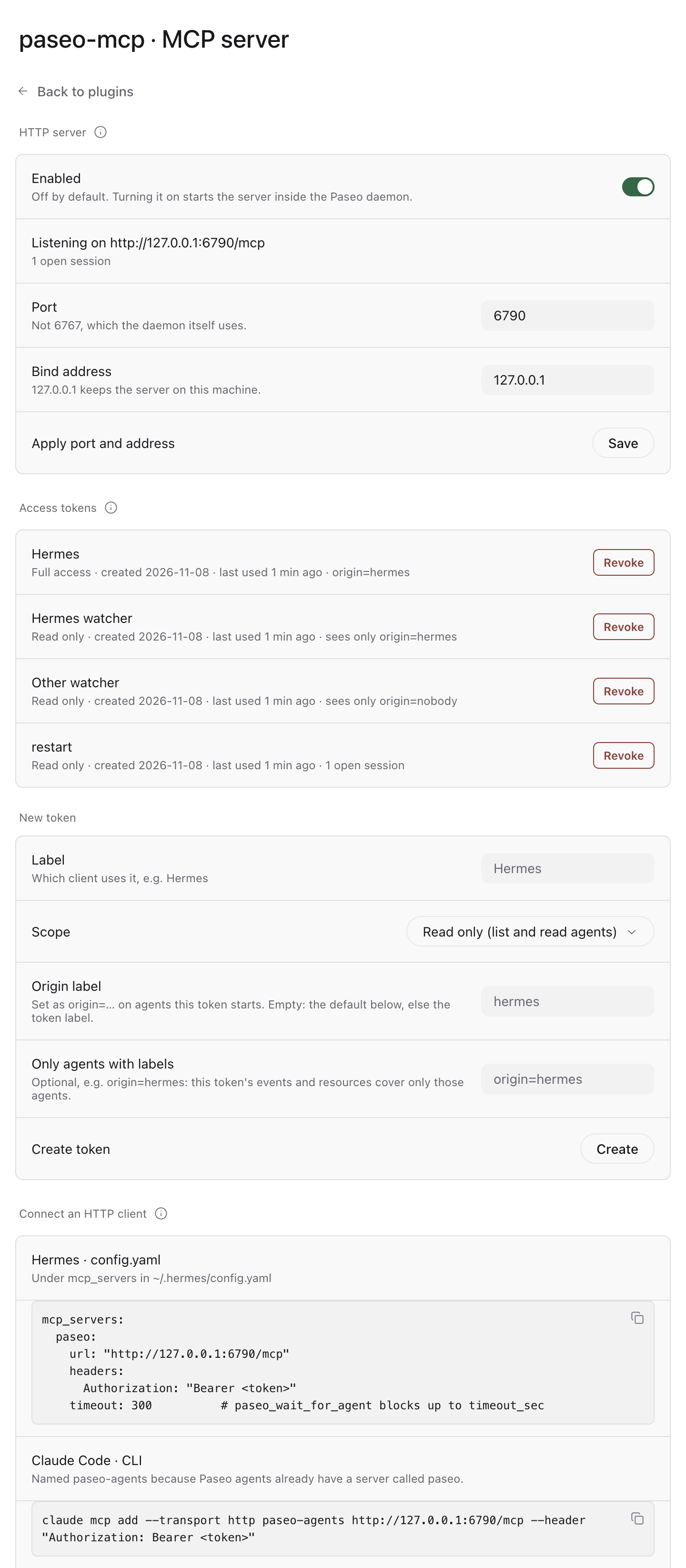
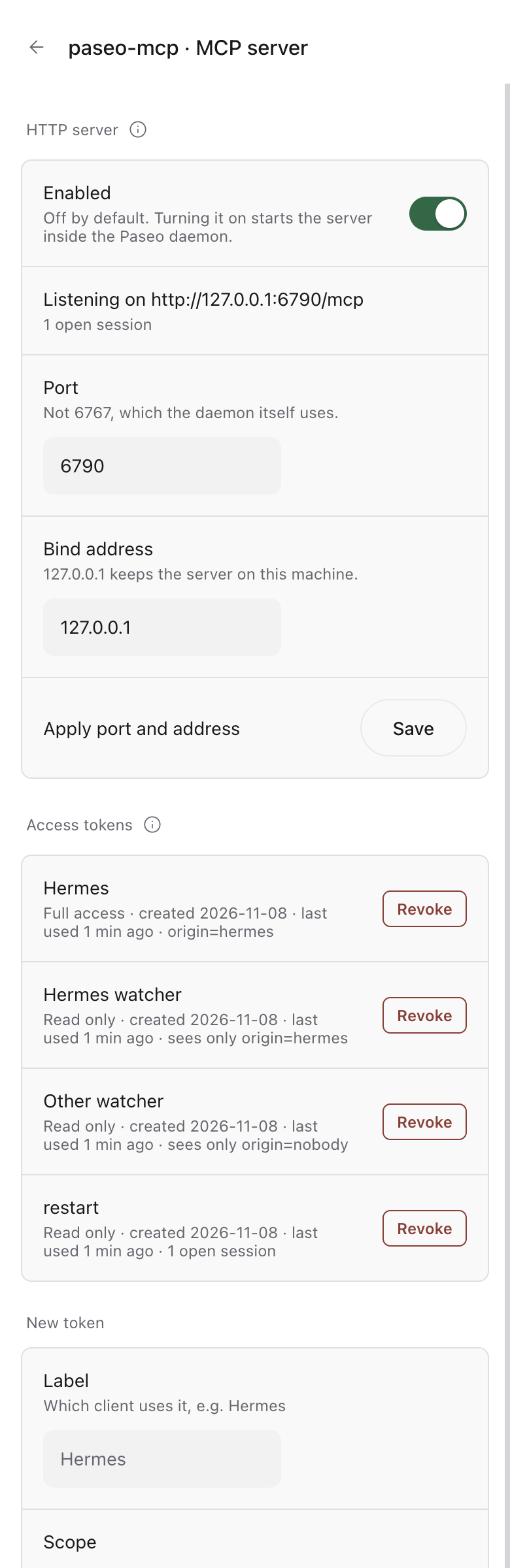
The MCP server settings screen in Paseo: HTTP server switch and status, port and bind address, access tokens with scope and last use, HTTP client configs. The same screen at phone width.

Off until you turn it on

Then it binds to 127.0.0.1:6790. Any other bind address must be typed in and comes with a warning.

A token on every request

Also from localhost. Stored only as a SHA-256 hash and compared in constant time. Revoking one ends its open sessions.

Scopes per client

A read token never sees a tool that changes something. The global read-only switch applies on top.

No DNS rebinding

Host and Origin headers must point at the server itself, and bodies are capped at 1 MiB.

Same guard rails

allowedRoots is checked on the daemon side, agents get an origin label per token, and permissions are never allowed on their own.

stdio keeps working

node dist/index.js with ~/.config/paseo-mcp/config.json behaves as before, and signs in with Paseo's local credential when the daemon has a password.

stdio clients through the plugin

Clients that start the server as a child process need neither the HTTP server nor a token.

  • A stable command. ~/.local/bin/paseo-mcp is rewritten on every load and follows plugin updates. A file the plugin did not write is never touched.
  • Test connection. Starts the server exactly like a client, lists the tools and counts the agents.
  • Status at a glance. Config file, allowed roots, accounts and how the server signs in; the credential stays masked.
  • Copyable configs for Hermes, Claude Code (.mcp.json and CLI) and any stdio client.
mcp_servers:
  paseo:
    command: "/Users/you/.local/bin/paseo-mcp"
    env:
      PASEO_MCP_CONFIG: "/Users/you/.config/paseo-mcp/config.json"
    timeout: 300
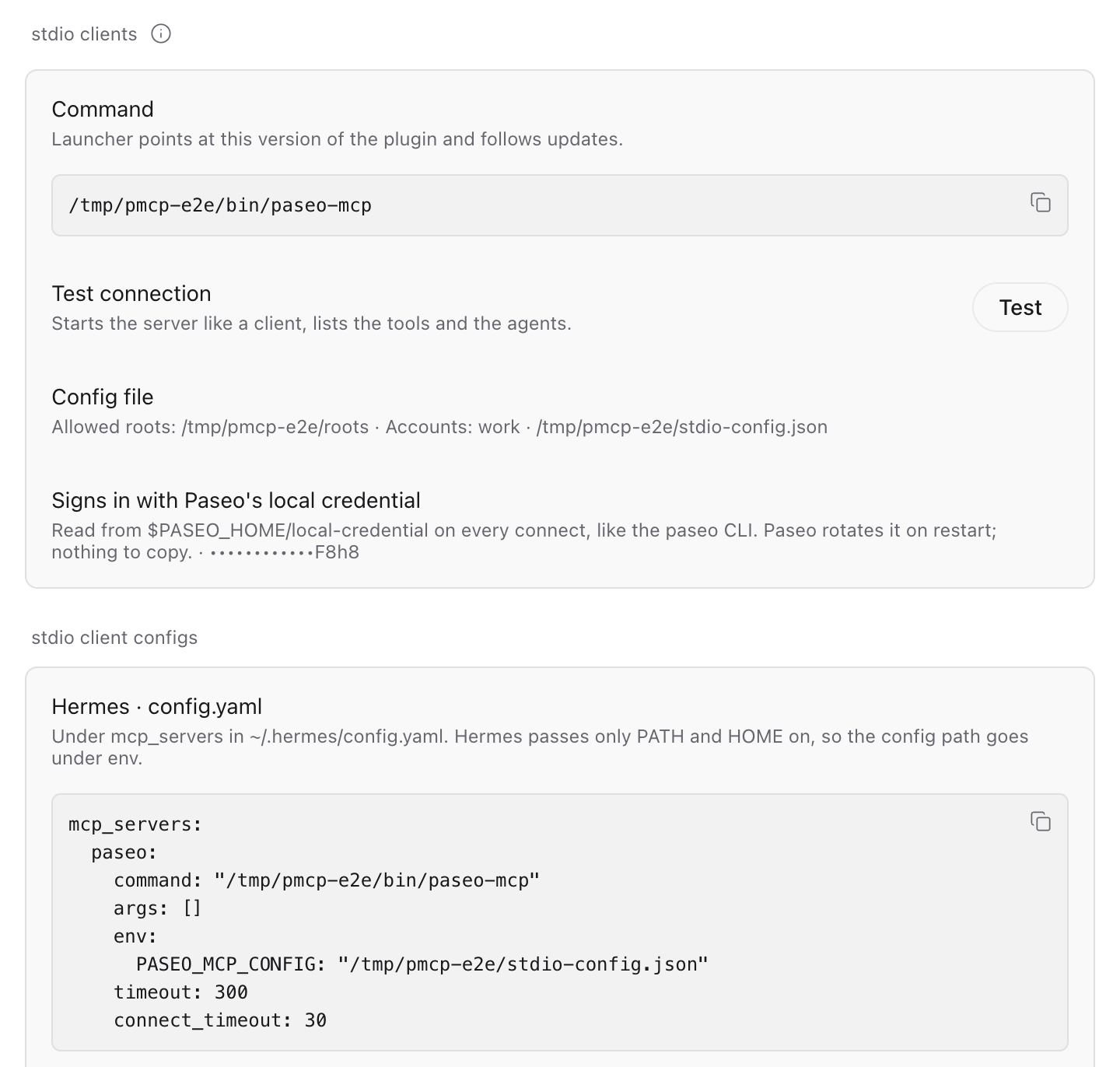
The stdio section: command, Test button, config file and sign-in status, Hermes config.

Events: be told instead of polling

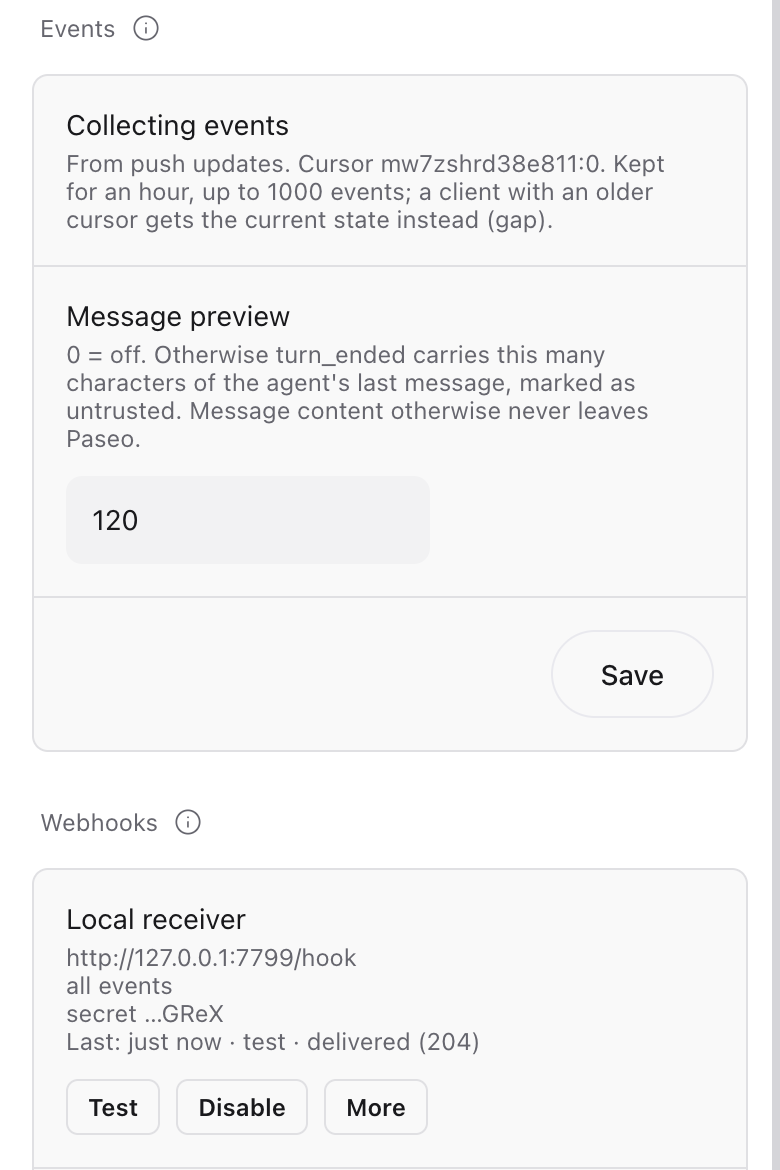
Agents finish, fail, hit a usage limit or wait for a permission while nobody watches. Both modes collect the same events, from Paseo's lifecycle hooks and the daemon's push updates, each happening once.

01 · ANY CLIENT

paseo_wait_for_events

A tool the model calls itself: returns at once if events are pending, else waits up to timeout_sec. Pass on next_cursor every time. Works where notifications are ignored.

02 · MCP NATIVE

Resource subscriptions

Subscribe to paseo://agents or paseo://agents/{id} and get resources/updated. Over HTTP on a resumable SSE stream (Last-Event-ID).

03 · PLUGIN

Signed webhooks

POSTs to your endpoints with HMAC-SHA256, a delivery id for idempotency, retries with backoff, bundling and auto-pause.

Cursor in, cursor out

# a consistent start: state plus a cursor
paseo_list_agents
  → { agents: [...], events_cursor: "mw7z…:41" }

paseo_wait_for_events cursor="mw7z…:41"
    timeout_sec=120 only_needs_attention=true
  → { events: [...], next_cursor: "mw7z…:44", gap: false }

# always continue with next_cursor
paseo_wait_for_events cursor="mw7z…:44" …

Filters: agent_ids, labels, types, only_needs_attention, limit. A token can be limited to labels such as origin=hermes.

Guarantees

  • Ordered: seq grows within an epoch; webhooks may overlap, sort by seq.
  • At least once: repeats only right after a list or a gap; skip them by id.
  • No silent loss: a cursor older than the buffer (1000 events, 60 min) or from before a restart gets gap: true and the current state.
  • Metadata only: no message content, except an opt-in preview marked untrusted.
TypeWhenExtra fields
agent.createdA new agent appeared
agent.turn_startedA turn began
agent.turn_endedA turn endedoutcome: finished, error, limit, canceled · error
agent.permission_requestedWaiting for a permissionpermission: requestId, name, title, kind
agent.permission_resolvedSomeone answeredpermission, resolution
agent.archivedArchived
agent.closedSession closed or agent gone

Every event: id (its cursor epoch:seq), at, agentId, title, status, labels, requiresAttention, attentionReason, source.

Webhooks

Settings → Plugins → paseo-mcp → New webhook. The secret is shown once and stays on the daemon. https:// anywhere, plain http:// only to localhost or private addresses.

# POST, application/json
Paseo-Mcp-Signature: t=1794150672,v1=<hex>
Paseo-Mcp-Delivery:  mw7z…:3      # same on every retry
Paseo-Mcp-Event-Id:  mw7z…:3

{ "delivery_id": "mw7z…:3", "sent_at": "…",
  "events": [ { "type": "agent.turn_ended", … } ] }
// verify over the raw body, before parsing
import { createHmac, timingSafeEqual } from "node:crypto";

function verify(secret, header, rawBody, toleranceSec = 300) {
  const { t, v1 } = Object.fromEntries(
    header.split(",").map((p) => p.split("=")));
  if (Math.abs(Date.now() / 1000 - Number(t)) > toleranceSec) return false;
  const mac = createHmac("sha256", secret)
    .update(`${t}.${rawBody}`).digest();
  const given = Buffer.from(v1 ?? "", "hex");
  return given.length === mac.length && timingSafeEqual(given, mac);
}

Answer 2xx fast. Errors, timeouts, 408, 429 and 5xx are retried up to 6 times (1, 2, 4, 8, 16 s). After 5 failed deliveries in a row the endpoint pauses until you resume it. A Python example is in the README.

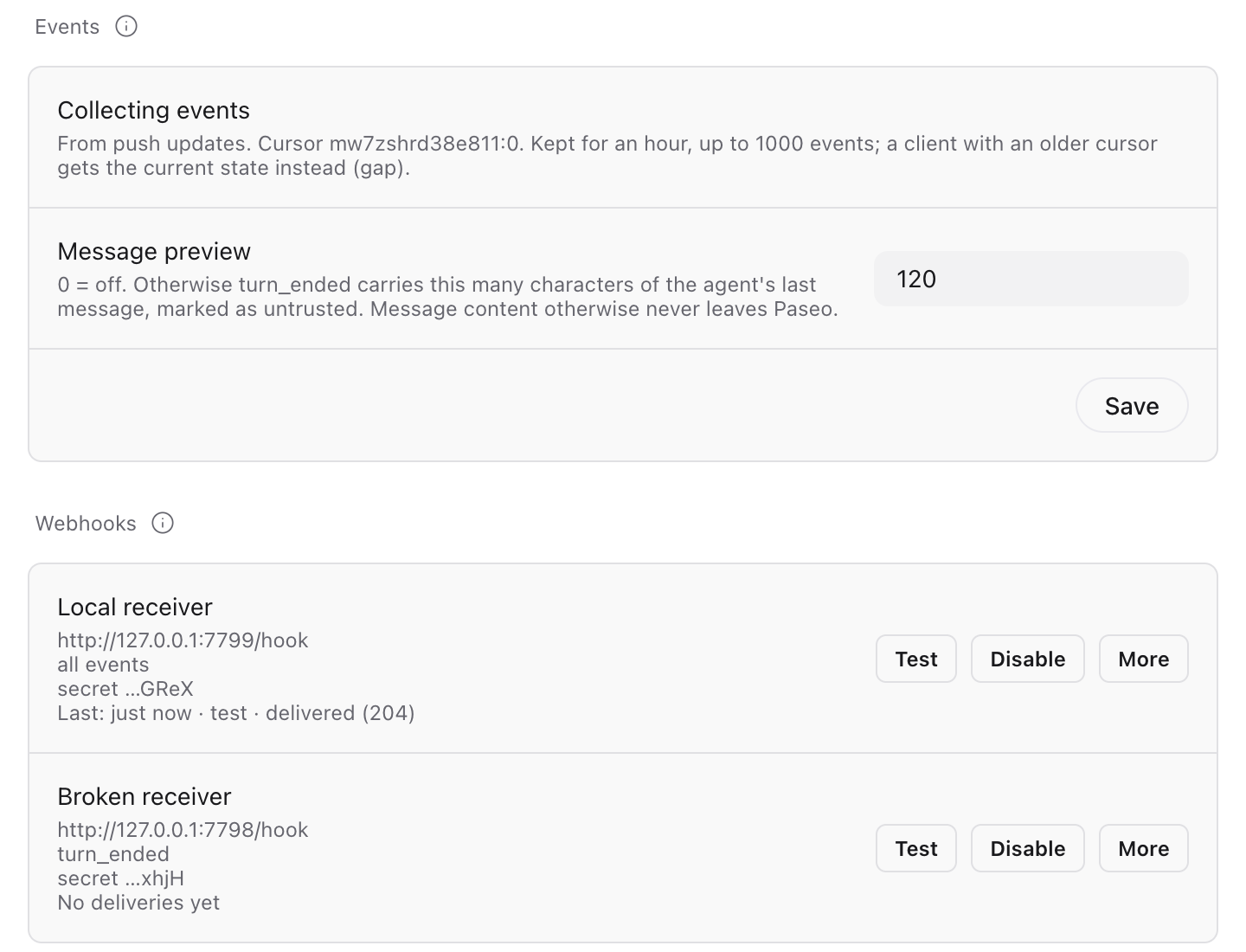
Events and webhooks on the settings screen: preview length, endpoints with Test, Disable and More, last delivery. The same at phone width.

How it works

A thin bridge. The server keeps no state of its own; every tool maps onto the Paseo daemon's agent API. Below is the stdio mode; in plugin mode the client talks HTTP to the plugin inside the daemon, which reaches the daemon over loopback with its local credential.

OrchestratorHermes, Claude Code
MCP
stdio
paseo-mcpthis server
WebSocket
@getpaseo/client
Paseo daemon127.0.0.1:6767
runs
Claude Code agentsvisible in the Paseo app
01

Client starts the server

As a child process; both talk MCP over stdin and stdout.

02

Server connects to Paseo

On the first tool call, with the official client library. It reconnects when the daemon restarts.

03

Checks before a start

The folder is resolved, symlinks included, and must lie inside allowedRoots. Labels and account are attached.

04

A normal Paseo chat

The agent shows up in the app and on your phone. You can read along or take over at any time.

Accounts: starting an agent with an account sets accountEnvVar (default CLAUDE_CONFIG_DIR) to that login's folder and adds the label account=<name>. Using Claude accounts for Paseo? Let the plugin stay in charge and set accountEnvVar to a name Claude Code ignores, such as PASEO_CLAUDE_ACCOUNT.

Tools

Agent ids can be passed in full or as a unique prefix, like the short ids paseo ls shows. In read-only mode and for read tokens only the first six exist. Resources paseo://agents and paseo://agents/{id} can be read and subscribed to.

ToolWhat it does
paseo_list_agentsAgents with status, account and attention flag. Filter by status, labels, archived
paseo_get_agentOne agent's state, including pending permission requests
paseo_read_timelineThe last N timeline entries as a compact transcript
paseo_list_accountsThe Claude accounts from your config
paseo_list_modelsModels of a provider as claude/<model-id>
paseo_wait_for_eventsAgent events since a cursor; waits until one happens. See Events
paseo_create_agentStart a new agent inside allowedRoots
paseo_send_messageSend a follow-up; steer or interrupt while it runs
paseo_wait_for_agentWait until the turn is done, failed, needs a permission, or times out
paseo_respond_permissionAllow or deny a permission request
paseo_archive_agentArchive a finished agent

Good to know

Mail and web text is untrusted input. Have your orchestrator ask you before it starts an agent from such content, and never pass it through unfiltered as a prompt.

Agent output is data. Transcripts and final messages come back with a note telling the orchestrator not to follow instructions inside them.

Permissions stay with you. Only let the orchestrator allow a permission request after you confirmed, unless it is clearly read-only.

Start by watching. readOnly: true or PASEO_MCP_READONLY=1 exposes only the list and read tools.

Update or test

# pull the latest version
git pull && npm install

# call tools like an MCP client would
npm run smoke -- paseo_list_accounts \
  'paseo_list_agents={"limit":5}'

Your MCP client picks up a new build the next time it starts the server.